Use our cool in-game overlays to achieve the best gaming experience! Harnessing the power of your GPU, hardware accelerated H.264 codecs and the various overlays, you will have an advantage over your opponents and you can share your victories. Players gave PlayClaw :: Overlays, Game Recording & Streaming a 68% positive score. Released November 20, 2017. Top tags include Utilities, Video Production, Audio Production, and Software Training.
Use our cool in-game overlays to achieve the best gaming experience!
Use our cool in-game overlays to achieve the best gaming experience! Harnessing the power of your GPU, hardware accelerated H.264 codecs and the various overlays, you will have an advantage over your opponents and you can share your victories.
Developed by Eduard Kozadaev · Published by Eduard Kozadaev
Player Review Breakdown
PlayClaw :: Overlays, Game Recording & Streaming has about 68 positive and 32 negative player reviews out of a total 100. We'll add a detailed breakdown here when there are more reviews.
68%
positive of 100 player reviews
Full Game Details
From the Devs
PlayClaw is game overlay application that can record and stream your gameplay!
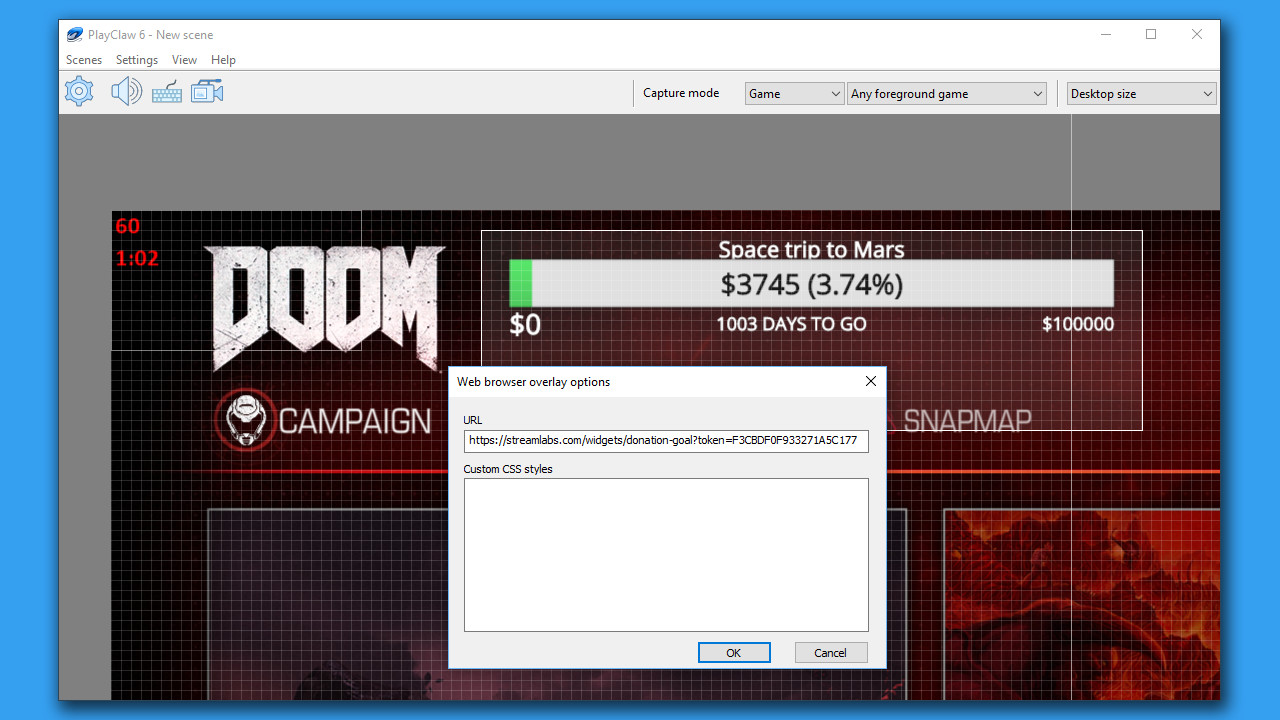
PlayClaw offers the ability to render helpful overlays in game and also in your recording if needed. PlayClaw has a set of various overlays such as System Information (CPU, GPU, RAM, HDD and other sensors), Teamspeak 3 and Discord overlays, Browser Overlay, Webcam Overlay, Timers and more.
PlayClaw has been designed to make full use of your GPU and hardware accelerated H.264 codecs that will ensure outstanding recording quality and have the least amount of impact on game performance. You'll be satisfied with the capture and encoding speed that PlayClaw offers during local recording sessions or streaming to YouTube, Twitch or other services!
Overlays:
Very flexible System information overlay (GPU, CPU, RAM, HDD, FPS, Network sensors)
Web Browser overlay (streamers love it!)
Webcam overlay
Teamspeak 3 overlay
Image overlay
Dynamic text overlay
Powerful Time overlay with modes: Clock, Stopwatch, Timer
Window capture overlay
Color overlay
And that's not all! We're developing new cool overlays for our customers
Capture features:
Fast game capture up to 200fps
Native capture available for DirectX 9, 10, 11, 12, OpenGL and Vulkan