We Love It's Guide to…
[The world’s FIRST and BEST overlay utility to prevent 3D motion sickness]Find the ideal settings to reduce your 3D motion sickness.Activate this when playing games or watching game streams.Windowed, pin to window, borderless window and borderless fullscreen are all available!
Released 12 Aug 2025
[The world’s FIRST and BEST overlay utility to prevent 3D motion sickness]Find the ideal settings to reduce your 3D motion sickness.Activate this when playing games or watching game streams.Windowed, pin to window, borderless window and borderless fullscreen are all available!
Developed by Bursia · Published by Bursia
![[Mulmiyac] for 3D motion sickness screenshot 1](https://shared.akamai.steamstatic.com/store_item_assets/steam/apps/3873150/ba29f45ec606f3a06b61c6b25eb22bbbe3c5d22c/ss_ba29f45ec606f3a06b61c6b25eb22bbbe3c5d22c.600x338.jpg?t=1785898472)
![[Mulmiyac] for 3D motion sickness screenshot 2](https://shared.akamai.steamstatic.com/store_item_assets/steam/apps/3873150/697a39ca12a6a145e2c400c27965cdb8d176e067/ss_697a39ca12a6a145e2c400c27965cdb8d176e067.600x338.jpg?t=1785898472)
![[Mulmiyac] for 3D motion sickness screenshot 3](https://shared.akamai.steamstatic.com/store_item_assets/steam/apps/3873150/f51177a841aa6cb807c6878c3ce3405a7b8bddbe/ss_f51177a841aa6cb807c6878c3ce3405a7b8bddbe.600x338.jpg?t=1785898472)
![[Mulmiyac] for 3D motion sickness screenshot 4](https://shared.akamai.steamstatic.com/store_item_assets/steam/apps/3873150/768619497b79b2ba981ed9a9bd55e19c4f69f9c4/ss_768619497b79b2ba981ed9a9bd55e19c4f69f9c4.600x338.jpg?t=1785898472)
![[Mulmiyac] for 3D motion sickness screenshot 5](https://shared.akamai.steamstatic.com/store_item_assets/steam/apps/3873150/85124a48bfee2085a63ba68f0a2ac7c29a9cacc9/ss_85124a48bfee2085a63ba68f0a2ac7c29a9cacc9.600x338.jpg?t=1785898472)
![[Mulmiyac] for 3D motion sickness screenshot 6](https://shared.akamai.steamstatic.com/store_item_assets/steam/apps/3873150/c4e779b9aaa44f6a7293138d44bb23fe2208bb30/ss_c4e779b9aaa44f6a7293138d44bb23fe2208bb30.600x338.jpg?t=1785898472)
![[Mulmiyac] for 3D motion sickness screenshot 7](https://shared.akamai.steamstatic.com/store_item_assets/steam/apps/3873150/ca522f462e5a191a495053a3be61edbecb24ee5f/ss_ca522f462e5a191a495053a3be61edbecb24ee5f.600x338.jpg?t=1785898472)
![[Mulmiyac] for 3D motion sickness screenshot 8](https://shared.akamai.steamstatic.com/store_item_assets/steam/apps/3873150/0cfd8af8219bb1700f0cf26a6531867924585c9d/ss_0cfd8af8219bb1700f0cf26a6531867924585c9d.600x338.jpg?t=1785898472)
[Mulmiyac] for 3D motion sickness has about 91 positive and 15 negative player reviews out of a total 106. We'll add a detailed breakdown here when there are more reviews.
My ex-girlfriend — who just so happens to be my wife now — used to suffer from severe 3D motion sickness.
I couldn’t share the games I had loved my entire life with her.
That was the moment I knew I had to do something.
So I built this utility — for her. And now, for all of you.
Don’t lose the love of your life over something as small as 3D motion sickness.
This program may slightly cover part of your screen…
But it might just show you what true happiness looks like!
Added Mulmiyac On/Off button
Added new Overlay types and styles
Greatly expanded Crosshair customization
Added Borderless Fullscreen mode
Added Subtitle Safe Area
Significantly improved Hotkeys with more functions
Application Size : 197 MB → 95 MB (-52%)
Memory Usage : 185 MB → 62 MB (-66%)
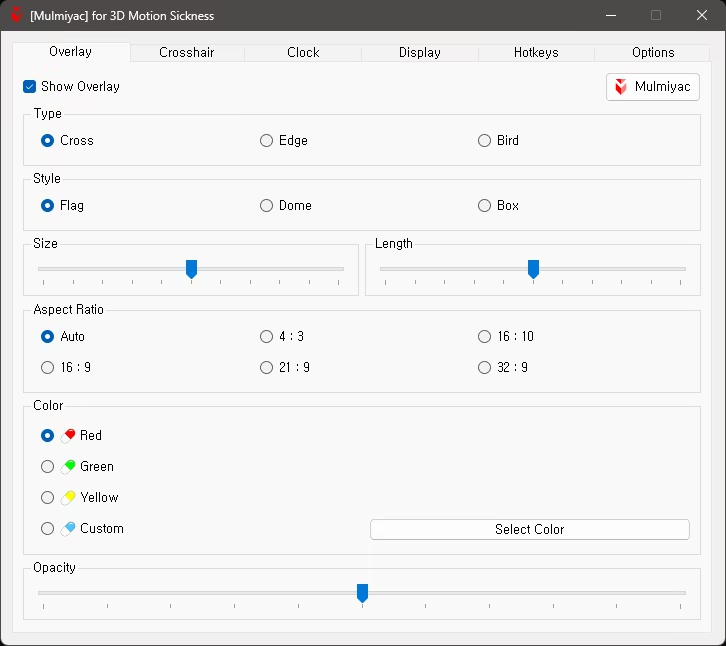
Show/Hide Overlay (Hotkeys can be assigned)
3 Types — Cross, Edge, Bird
3 Styles — Flag(Diamond), Dome(Circle), Box
Size & Length Slider
6 Aspect Ratios — Auto, 4 : 3, 16 : 10, 16 : 9, 21 : 9, 32 : 9
4 Colors — Red, Green, Yellow, Custom (Hotkeys can be assigned)
Opacity Slider (Hotkeys can be assigned)
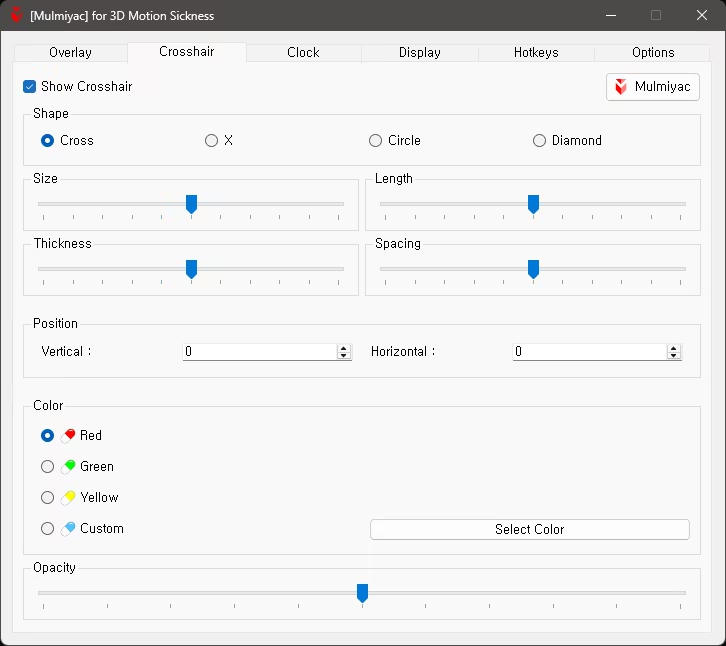
Show/Hide Crosshair (Hotkeys can be assigned)
4 Shapes — Cross, X, Circle, Diamond
Size & Length Slider
Thickness & Spacing Slider
Adjust Position — Directly specify Y, X coordinates
4 Colors — Red, Green, Yellow, Custom (Hotkeys can be assigned)
Opacity Slider (Hotkeys can be assigned)
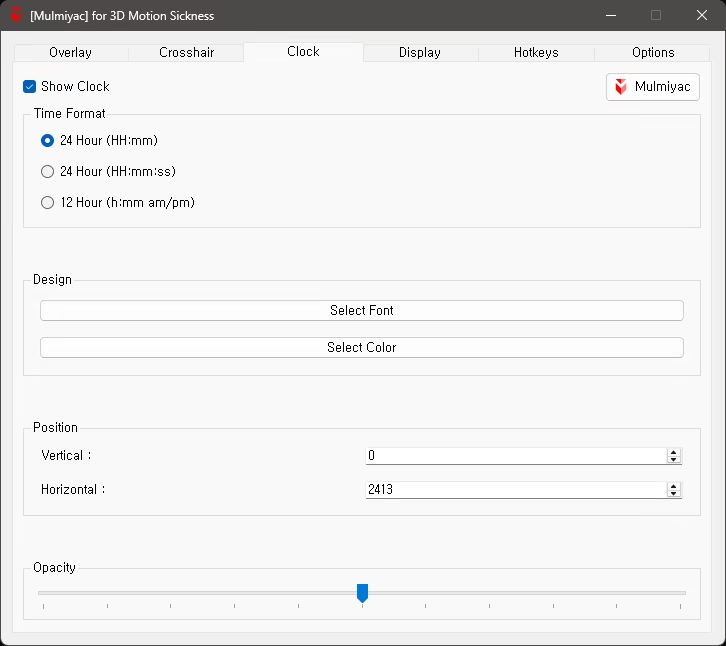
Show/Hide Clock (Hotkeys can be assigned)
3 Time Formats — HH:mm, HH:mm:ss, h:mm am/pm
Font Settings
Color Settings
Adjust Position — Directly specify Y, X coordinates or drag with mouse
Opacity Slider
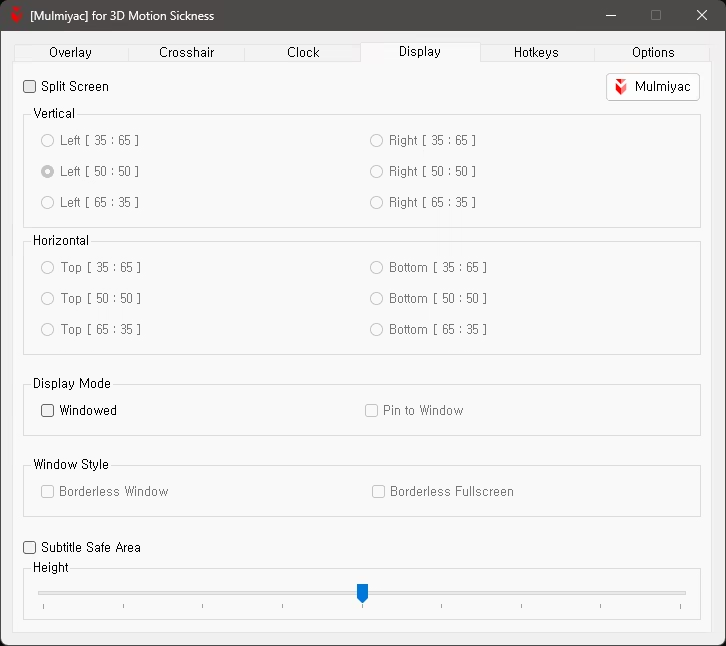
Enable/Disable Split Screen (Hotkeys can be assigned)
12 Split Screen Options — Left, Right, Top, Bottom (Hotkeys can be assigned)
Display Mode — Windowed, Pin to Window (Hotkeys can be assigned)
Window Style — Borderless Window, Borderless Fullscreen (Hotkeys can be assigned)
Enable/Disable Subtitle Safe Area (Hotkeys can be assigned)
Height Slider
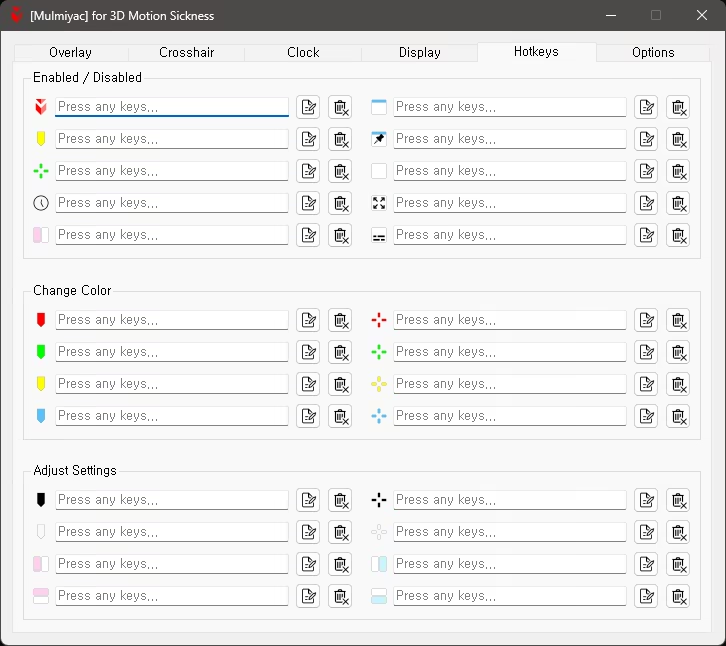
10 Enabled / Disabled Hotkeys
8 Color Change Hotkeys — Overlay, Crosshair
8 Settings Adjustment Hotkeys — Opacity, Split Screen
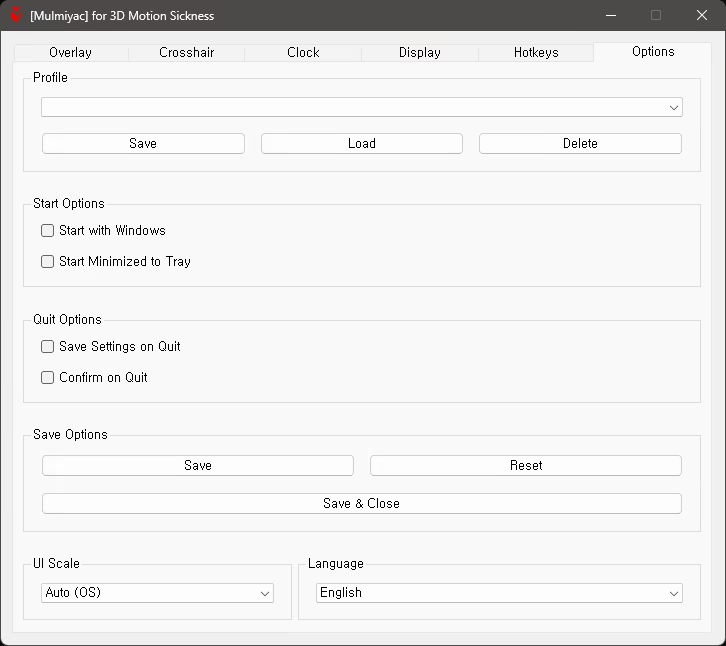
Save/Load Profile — Overlay, Crosshair, Clock (Hotkeys are not saved per profile)
Automatic launch at Windows startup option
Minimize to Tray on first launch option
Automatically save settings when closing program option
Show confirmation message before closing program
Select UI Size — Auto (OS), 100% ~ 200%
Select Language — 60 languages
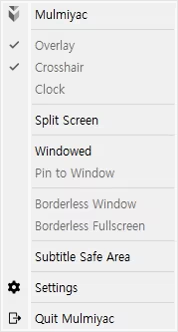
Mulmiyac — On/Off Mulmiyac (Same function as double-clicking the tray icon)
Overlay — Show/Hide Overlay
Crosshair — Show/Hide Crosshair
Clock — Show/Hide Clock
Split Screen — Enable/Disable
Windowed — Enable/Disable
Pin to Window — Enable/Disable
Borderless Window — Enable/Disable
Borderless Fullscreen — Enable/Disable
Subtitle Safe Zone — Enable/Disable
Settings — Open Settings window
Quit Mulmiyac — Exit Software
If the game does not support borderless fullscreen, you can change the window style after pinning the window
If the effect is weak, it is recommended to set the overlay large and find an appropriate opacity
It is recommended to register a hotkey to On/Off Mulmiyac
Settings and profiles can be saved to Steam Cloud
May conflict with anti-cheat programs (no conflicts reported yet)
Software is usable in all PC environments, including Steam games
| Platforms | Windows |
|---|---|
| Controller required | No |
Games similar to [Mulmiyac] for 3D motion sickness